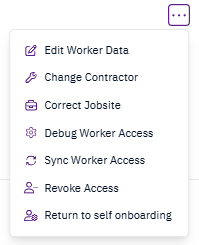
Workers sometimes register with the wrong contractor during onboarding or transition between contractors. You can update their contractor at any time after onboarding. Navigate to the worker’s profile, select the Jobsites tab, then click the menu on the relevant jobsite and select Change Contractor.
Selecting Change Contractor from the menu
Select the correct contractor from the dropdown and choose an effective date:
  • Retroactive — applies from the start of the assignment. Use this if the worker registered with the wrong contractor.
  • Current date — takes effect today. Use this if the worker has switched contractors.