

- Badge number — the unique identifier for the badge. ID cards have no badge number, so this is blank for them.
- Status — whether the badge is Active or Inactive
- Type — the badge type, such as permanent, temporary, or ID card
- Expiration date — the expiration date, if the badge is temporary
Assign a badge
You can assign a new badge from the Badges tab by clicking Add Badge.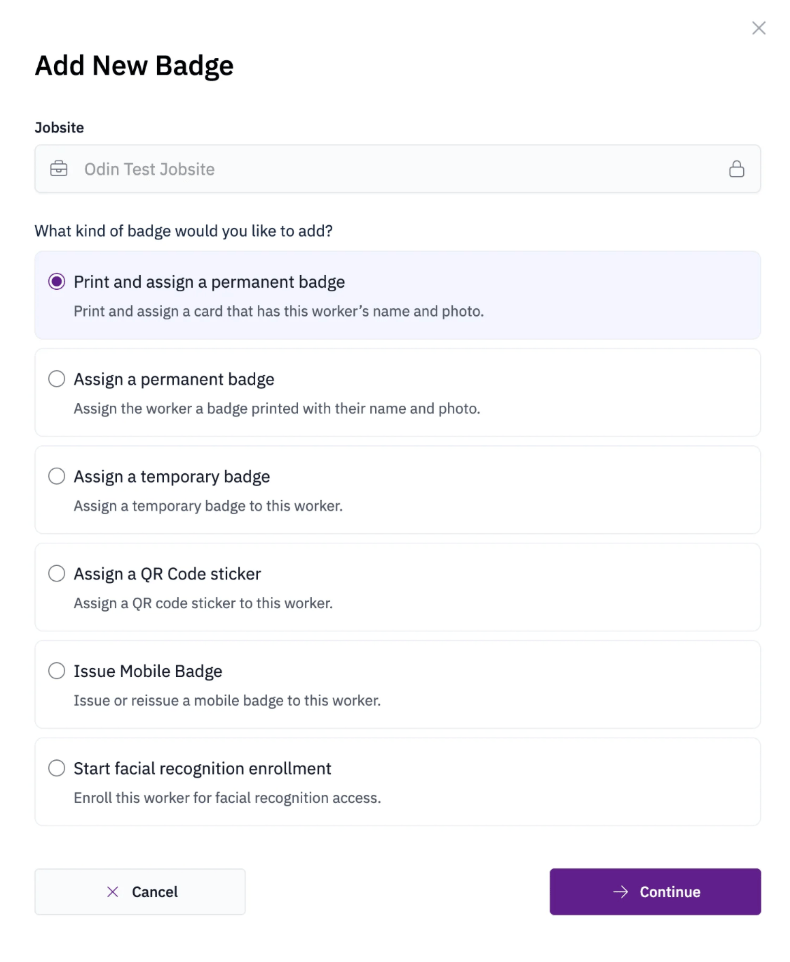
- Permanent badge — a printed badge assigned to the worker for long-term use. Some permanent badges include tap technology for use with compatible card readers.
- Temporary badge — a short-term badge assigned to a worker who is waiting for a permanent badge or visiting temporarily.
- ID card — an ID-only badge with the worker’s QR code and photo, printed on a blank PVC card with no badge number. ID cards do not work with tap card readers.
- QR code sticker — a sticker placed on a hardhat or badge that can be scanned at a kiosk or with the Odin mobile app.
- Mobile badge — a digital badge issued to the worker’s mobile device.
- Facial recognition — starts the facial recognition enrollment process for the worker.
Assigning a badge to a worker requires one of the following roles: Jobsite Admin, Site Safety Manager, Security Supervisor, or Security.